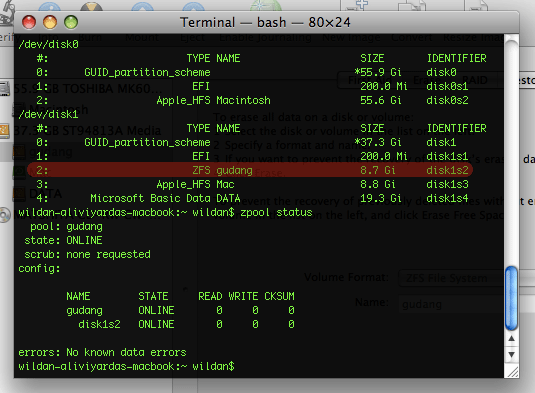
ADC announced its release of ZFS on Mac OS X few day ago. As we know, Leopard arrived with zfs read only support (few month ago, the rumor is ZFS to replace HFS+) . But, with this developer seed you can create pool and read/write your zfs partition. To create pool, you must have two physically device, not two file systems. My Assumption, you can make backup partition (Time Machine ?) with ZFS Pool on Macbook using two USB ports and two Eksternal HDD. This is still developer version, so don’t use your ZFS partition to backup your data.
iPatcher for Leopard

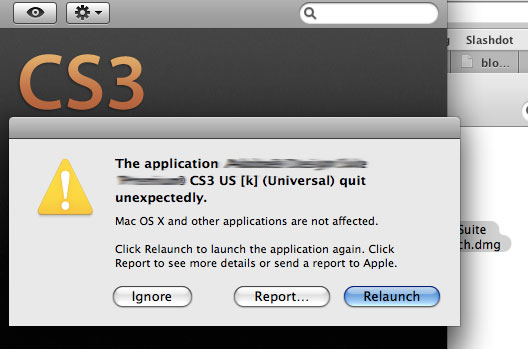
That message had appeared when I tried to open some patch (like some_patch_CS3.app). Log file said the problem was came from ipatcher. I think the ipatcher (UNIX binary) didn’t work for leopard. First, I try open that patch using Rosetta. The Application work fine, but when I try to patch (Drag-and-Drop into drop box) them, the patch said my application (CS3 family..) can’t be patched. So, I try to download another CS3 Patch for Leopard (from demonoid torrent) with new ipatcher inside. But that Patch Application didn’t work too!
I try to replace ipatcher from new patch packages into my old patch. Then, open the patch again..You won’t have crash report from your Leopard. Happy Drag-and-Drop into drop box.. (Application successfully patched!)
Download mirror (rapidshare)
How to use :
1. Right Click The Old CS3 Patch > Choose Show Packages Contents > Open Folder Contents > MacOS
2. You’ll find iPatcher there. Then, replace the old iPatcher with the new downloaded iPatcher.
3. Open your CS 3 Patch (with new ipatcher has moved on), drag-and-drop your CS3 Apps (PS, AI, DW, etc) to get patched.
Then, you can fresh install CS3 on Leopard.
Bisa digunakan untuk sejumlah Patch (yang menggunakan iPatcher). Saya juga nyarinya ampe begadang semaleman, daftar forum cina kesana-kemari demi CS3 bisa fresh install di Leopard. 😛
Leopard Review (1)
H+3 menggunakan leopard, baru sekarang bikin reviewnya. Fitur Coverflow pada findernya benar-benar bagus. Bisa melihat file Office 2007 (.docx, .xlsx, dll) tanpa perlu menginstall Office atau iWork. Jika file dijalankan, maka akan dibuka oleh TextEdit.
Fitur lainnya yang saya nanti-natikan pada leopard adalah Mail.app yang mendukung RSS. Selain itu, pada Mail juga terdapat tambahan Actvity Viewer dan Connectivity Doctor untuk mengecek konektvitas Mail Client ke Mail Server.
Oya, one more thing (niru Jobs..:p). Leopard ini kok rasanya berat banget ya, mirip-mirip Vista. Leopard ini di-install pada Macbook Core Duo 1,83 Ghz dengan RAM 1,25 GB. Mungkin harus upgrade jadi 2 GB.. Hehehe..
====================================================================
Update 1:
RAM Macbook udah jadi 2 GB.
+ Genie effect lancar jaya.
+ Buka aplikasi lebih cepat daripada Tiger (walaupun RAM 1,25 GB).
+ Memory management-nya mantap (Free memory tetep gede), sehingga CPU load kecil. So, kipasnya gak pake bising.. Hehehe..
– Expose-nya itu lho..gak nahan bos..berat bener…(btw, katanya waktu launching 10.4.0 juga kayak gini..mudah2an setelah 10.5.1 jadi lancar..:p)
Update 2 :
+ Semua fitur pada Mail sudah jalan. Mantap!
+ *CS 3 udah bisa fresh install..
Leopard 9A581 = Final Retail
Leopard Golden Master build 9A581 ini diisukan adalah versi yang akan dijual ke pasaran. Cara membuktikannya adalah dengan membandingkan build hasil install Mac OS X DVD dengan build Golden Master ini.
Tadi malam saya juga masi ragu dengan build ini, akhirnya saya putuskan untuk menginstal leopard GM pada Macbook CoreDuo dengan harapan bahwa ini adalah benar-benar retail version. Release Leopard Retail version di Indonesia sendiri baru mulai minggu depan. Setelah semaleman browsing gak nemu-nemu, pagi ini saya menemukan bahwa Leopard Retail memiliki build 9A581.
Sayangnya, saya masih belum menemukan screenshot “System Profiler” bagian Software dari Leopard Retail Version. Rekan-rekan yang berada di luar sana mungkin ada yang bisa memberikan screenshot-nya.Hehehehe..
ini screenshotnya :
http://forum.insanelymac.com/lofiversion/index.php/t67830.html